> ## Documentation Index
> Fetch the complete documentation index at: https://www.zippendo.com/docs/llms.txt
> Use this file to discover all available pages before exploring further.
# Export organization data
> Request a Settings → Organization data archive of shipments, orders, and setup. Credentials are never included.
**Data export** sits on **Settings → Organization**, below [Organization branding](/docs/how-to/branding) and above [Danger zone](/docs/how-to/danger-zone). Open Settings from the organization switcher → **Manage** (`/{slug}/dashboard/settings/organization`). Walkthrough: [Settings, team, and brands](/docs/tutorials/settings-team-brands).
This is the organization archive. Dashboard charts use a different download: [Export dashboard CSV](/docs/how-to/dashboard-csv-export).
## Where it lives
Page title **Settings**. Description: **Manage your organization, team, and preferences.** The **Organization** tab also has the profile, customs identifiers, branding, and **Danger Zone**.
There is no format picker, date range, or “include documents” checkbox. **Request export** always asks for documents as well as records.
## Data export
Card title **Data export**. Description: **Download everything your organisation has put into Zippendo: company and user details, shipments and orders including recipient information and tracking history, and your integration setup. Credentials are never included.**
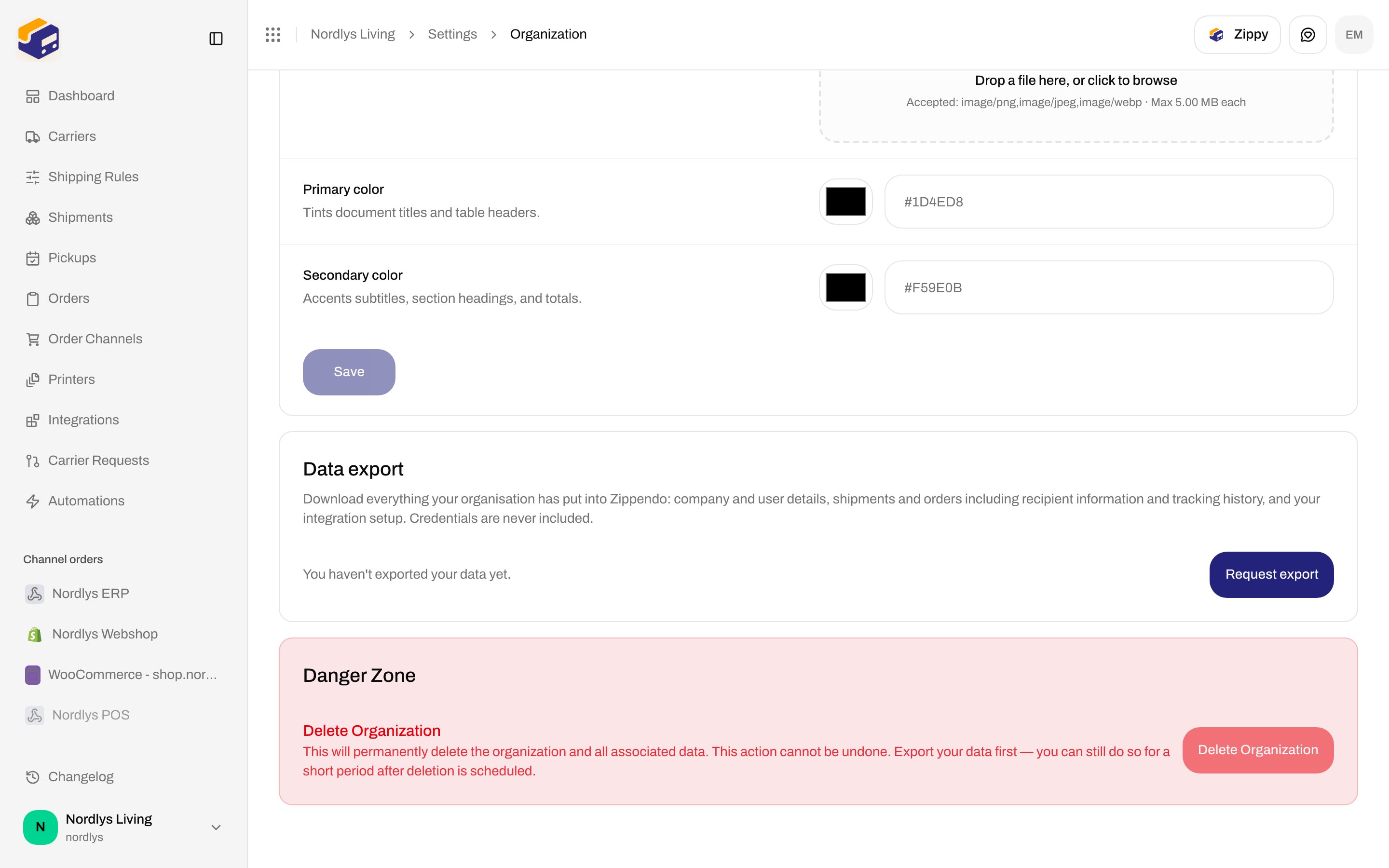
 | Control | What it is |
| ------------------ | ------------------------------------------------------------------------------------------------------------------------------------------------------------------------- |
| Status line | One of the states below. The list polls every few seconds while an export is still building. |
| **Download** | Shown only when the latest export is completed. Mints a short-lived link and starts the download. While the link is minted: **Preparing link…**. |
| **Request export** | Starts a new archive. Disabled with no organization, while the request is in flight, or while an export is already building. Label **Preparing…** in those pending cases. |
### Status copy
| State | Copy |
| -------------- | ----------------------------------------------------------------------------------------------------------------------------------- |
| Loading | **Checking for existing exports…** |
| Never exported | **You haven't exported your data yet.** |
| Building | **Preparing your export. This can take a few minutes for large accounts — we'll email you when it's ready.** |
| Ready | **Export from \{date} · \{size}** (size as B / KB / MB / GB, or — if unknown) |
| Expiry | **Available to download until \{date}.** |
| Truncated | **Some documents were left out because the archive reached its size limit. See documents\_omitted.csv inside the archive.** (amber) |
| Failed | **Your last export could not be prepared. Please try again.** |
| Expired | **Your last export has expired. Request a new one to download your data.** |
Dates use a long month name (for example 10 September 2026).
Organization switcher → **Manage** → **Organization**. Scroll to **Data export**.
Click **Request export**. The status switches to the building copy.
Large accounts take a few minutes. When the archive is ready, download it here or from the email.
Click **Download** before the expiry date. After that, request a new export.
### Toasts
| Action | Success | Failure fallback |
| -------- | --------------------------------------------------------------------- | ---------------------------------- |
| Request | **We're preparing your export. You'll get an email when it's ready.** | **Could not start the export** |
| Download | (browser download) | **Could not prepare the download** |
API codes the card can surface:
| Code | Message |
| ------------------------- | ----------------------------------------------------------------------- |
| `DATA_EXPORT_IN_PROGRESS` | **A data export is already being prepared for this organization.** |
| `DATA_EXPORT_NOT_READY` | **This data export is still being prepared. Please try again shortly.** |
| `DATA_EXPORT_EXPIRED` | **This data export has expired. Please request a new one.** |
| `DATA_EXPORT_FAILED` | **The data export could not be prepared. Please try again.** |
| `DATA_EXPORT_NOT_FOUND` | **The data export was not found.** |
## Before you delete the organization
**Delete Organization** on the same tab stays disabled. If you need the org removed, export first — the danger-zone copy is **Export your data first — you can still do so for a short period after deletion is scheduled.** See [Danger zone](/docs/how-to/danger-zone).
## Related
* [Organization settings](/docs/how-to/organization-settings) — name and customs IDs on the same tab.
* [Organization branding](/docs/how-to/branding)
* [Export dashboard CSV](/docs/how-to/dashboard-csv-export) — analytics CSV, not this archive.
* [Danger zone](/docs/how-to/danger-zone)
* [Organization](/docs/settings/organization)
| Control | What it is |
| ------------------ | ------------------------------------------------------------------------------------------------------------------------------------------------------------------------- |
| Status line | One of the states below. The list polls every few seconds while an export is still building. |
| **Download** | Shown only when the latest export is completed. Mints a short-lived link and starts the download. While the link is minted: **Preparing link…**. |
| **Request export** | Starts a new archive. Disabled with no organization, while the request is in flight, or while an export is already building. Label **Preparing…** in those pending cases. |
### Status copy
| State | Copy |
| -------------- | ----------------------------------------------------------------------------------------------------------------------------------- |
| Loading | **Checking for existing exports…** |
| Never exported | **You haven't exported your data yet.** |
| Building | **Preparing your export. This can take a few minutes for large accounts — we'll email you when it's ready.** |
| Ready | **Export from \{date} · \{size}** (size as B / KB / MB / GB, or — if unknown) |
| Expiry | **Available to download until \{date}.** |
| Truncated | **Some documents were left out because the archive reached its size limit. See documents\_omitted.csv inside the archive.** (amber) |
| Failed | **Your last export could not be prepared. Please try again.** |
| Expired | **Your last export has expired. Request a new one to download your data.** |
Dates use a long month name (for example 10 September 2026).
Organization switcher → **Manage** → **Organization**. Scroll to **Data export**.
Click **Request export**. The status switches to the building copy.
Large accounts take a few minutes. When the archive is ready, download it here or from the email.
Click **Download** before the expiry date. After that, request a new export.
### Toasts
| Action | Success | Failure fallback |
| -------- | --------------------------------------------------------------------- | ---------------------------------- |
| Request | **We're preparing your export. You'll get an email when it's ready.** | **Could not start the export** |
| Download | (browser download) | **Could not prepare the download** |
API codes the card can surface:
| Code | Message |
| ------------------------- | ----------------------------------------------------------------------- |
| `DATA_EXPORT_IN_PROGRESS` | **A data export is already being prepared for this organization.** |
| `DATA_EXPORT_NOT_READY` | **This data export is still being prepared. Please try again shortly.** |
| `DATA_EXPORT_EXPIRED` | **This data export has expired. Please request a new one.** |
| `DATA_EXPORT_FAILED` | **The data export could not be prepared. Please try again.** |
| `DATA_EXPORT_NOT_FOUND` | **The data export was not found.** |
## Before you delete the organization
**Delete Organization** on the same tab stays disabled. If you need the org removed, export first — the danger-zone copy is **Export your data first — you can still do so for a short period after deletion is scheduled.** See [Danger zone](/docs/how-to/danger-zone).
## Related
* [Organization settings](/docs/how-to/organization-settings) — name and customs IDs on the same tab.
* [Organization branding](/docs/how-to/branding)
* [Export dashboard CSV](/docs/how-to/dashboard-csv-export) — analytics CSV, not this archive.
* [Danger zone](/docs/how-to/danger-zone)
* [Organization](/docs/settings/organization)