> ## Documentation Index
> Fetch the complete documentation index at: https://www.zippendo.com/docs/llms.txt
> Use this file to discover all available pages before exploring further.
# Create a brand
> Create a brand from Settings → Brands with Brand name and Slug, then open the brand page for invoice details and document branding.
A **brand** is a sub-account inside the same organization — separate orders, shipments, and document branding, one bill and one team. Brands are included on **Pro** (up to five) and **Enterprise** (unlimited). On **Free**, **Standard**, and **Growth**, the **Brands** tab is visible but locked.
Walkthrough: [Settings, team, and brands](/docs/tutorials/settings-team-brands). After create, invoice details, logo, and colours are on [Organization branding](/docs/how-to/branding) (brand detail). Switching which brand you are working in is [Switch organization and brand](/docs/how-to/switch-organization-and-brand).
## Where it lives
Open the organization switcher → **Manage**, then the **Brands** tab (`/{slug}/dashboard/settings/brands`). Header action: **Add brand** (`brands.create-button`) when the plan includes brands and you are not brand-locked. Modal id: `create-brand`.
## Empty state
If you have no brands yet:
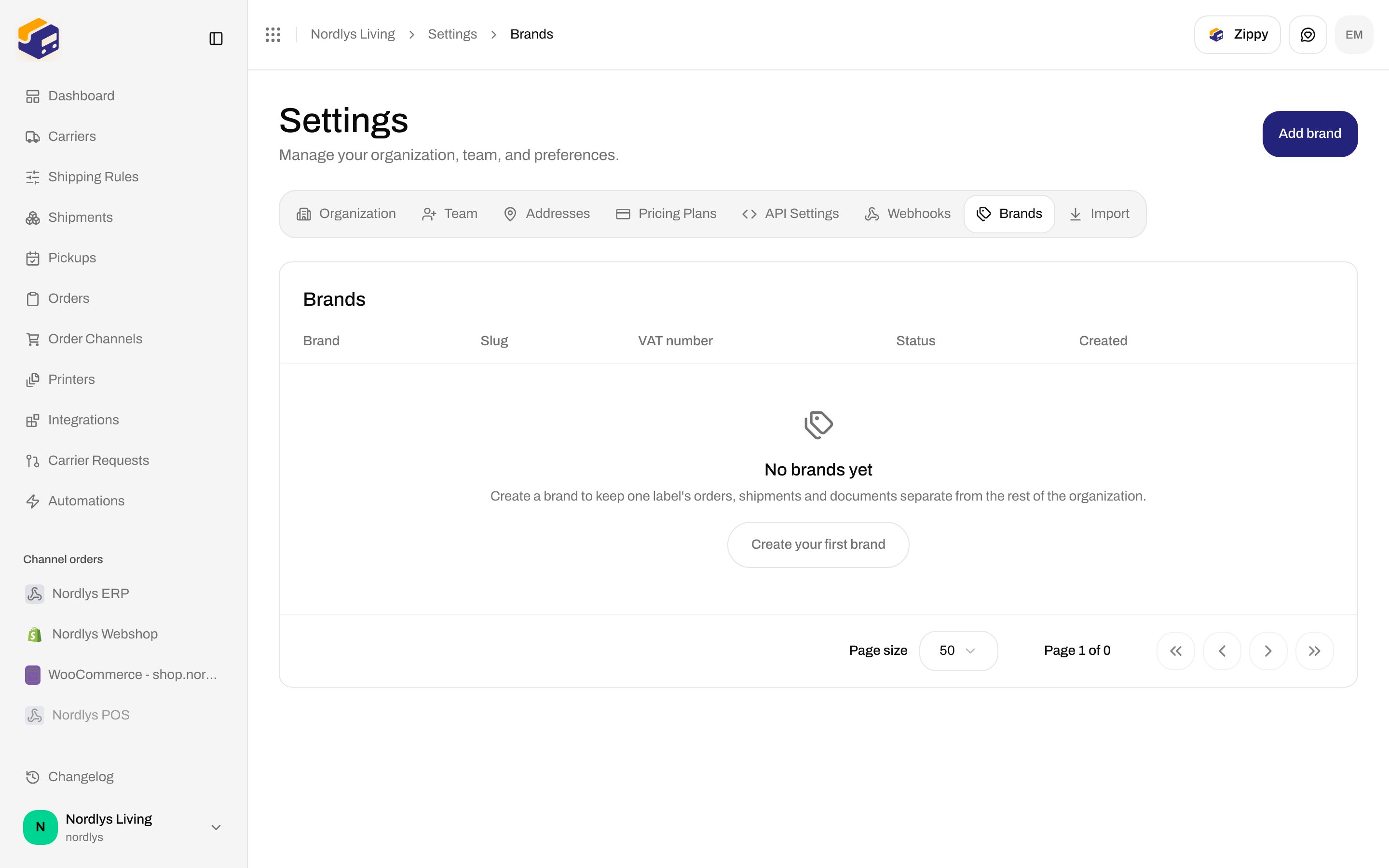
 | Control | What it is |
| --------------------------- | ------------------------------------------------------------------------------------------------------------------ |
| Page title | **Settings** |
| Card title | **Brands** |
| Card description | **Sub-accounts that keep each brand's data separate, with their own invoice details and document branding.** |
| **Add brand** | Header button. Shown when the plan includes brands and you are not brand-locked. Opens **New brand**. |
| Empty title | **No brands yet** |
| Empty description | **Create a brand to keep one label's orders, shipments and documents separate from the rest of the organization.** |
| **Create your first brand** | Empty-state button. Opens the same **New brand** dialog. |
### Locked plan
On a plan without brands, an upsell covers the table:
| Copy | Text |
| ----------- | ------------------------------------------------------------------------------------------------------------ |
| Title | **Brands are available on Pro** |
| Description | **Keep each brand's orders, shipments and documents separate, with their own invoice details and branding.** |
| Primary | **Upgrade plan** — opens [Pricing Plans](/docs/how-to/billing-and-usage) |
| Secondary | **See docs** |
The API may also return `FEATURE_NOT_AVAILABLE`: **This feature is not available on your current plan.**
### Brand-locked membership
If your membership is restricted to one brand, the **Brands** tab is hidden. Opening the route shows **Brands cannot be managed from this account** / **Your account is restricted to a single brand. Ask an organization-wide administrator to create, edit or archive brands.**
## New brand
The dialog title is **New brand**. Subtitle: **Name it now. Invoice details, logo and colours come next.**
| Control | What it is |
| --------------------------- | ------------------------------------------------------------------------------------------------------------------ |
| Page title | **Settings** |
| Card title | **Brands** |
| Card description | **Sub-accounts that keep each brand's data separate, with their own invoice details and document branding.** |
| **Add brand** | Header button. Shown when the plan includes brands and you are not brand-locked. Opens **New brand**. |
| Empty title | **No brands yet** |
| Empty description | **Create a brand to keep one label's orders, shipments and documents separate from the rest of the organization.** |
| **Create your first brand** | Empty-state button. Opens the same **New brand** dialog. |
### Locked plan
On a plan without brands, an upsell covers the table:
| Copy | Text |
| ----------- | ------------------------------------------------------------------------------------------------------------ |
| Title | **Brands are available on Pro** |
| Description | **Keep each brand's orders, shipments and documents separate, with their own invoice details and branding.** |
| Primary | **Upgrade plan** — opens [Pricing Plans](/docs/how-to/billing-and-usage) |
| Secondary | **See docs** |
The API may also return `FEATURE_NOT_AVAILABLE`: **This feature is not available on your current plan.**
### Brand-locked membership
If your membership is restricted to one brand, the **Brands** tab is hidden. Opening the route shows **Brands cannot be managed from this account** / **Your account is restricted to a single brand. Ask an organization-wide administrator to create, edit or archive brands.**
## New brand
The dialog title is **New brand**. Subtitle: **Name it now. Invoice details, logo and colours come next.**
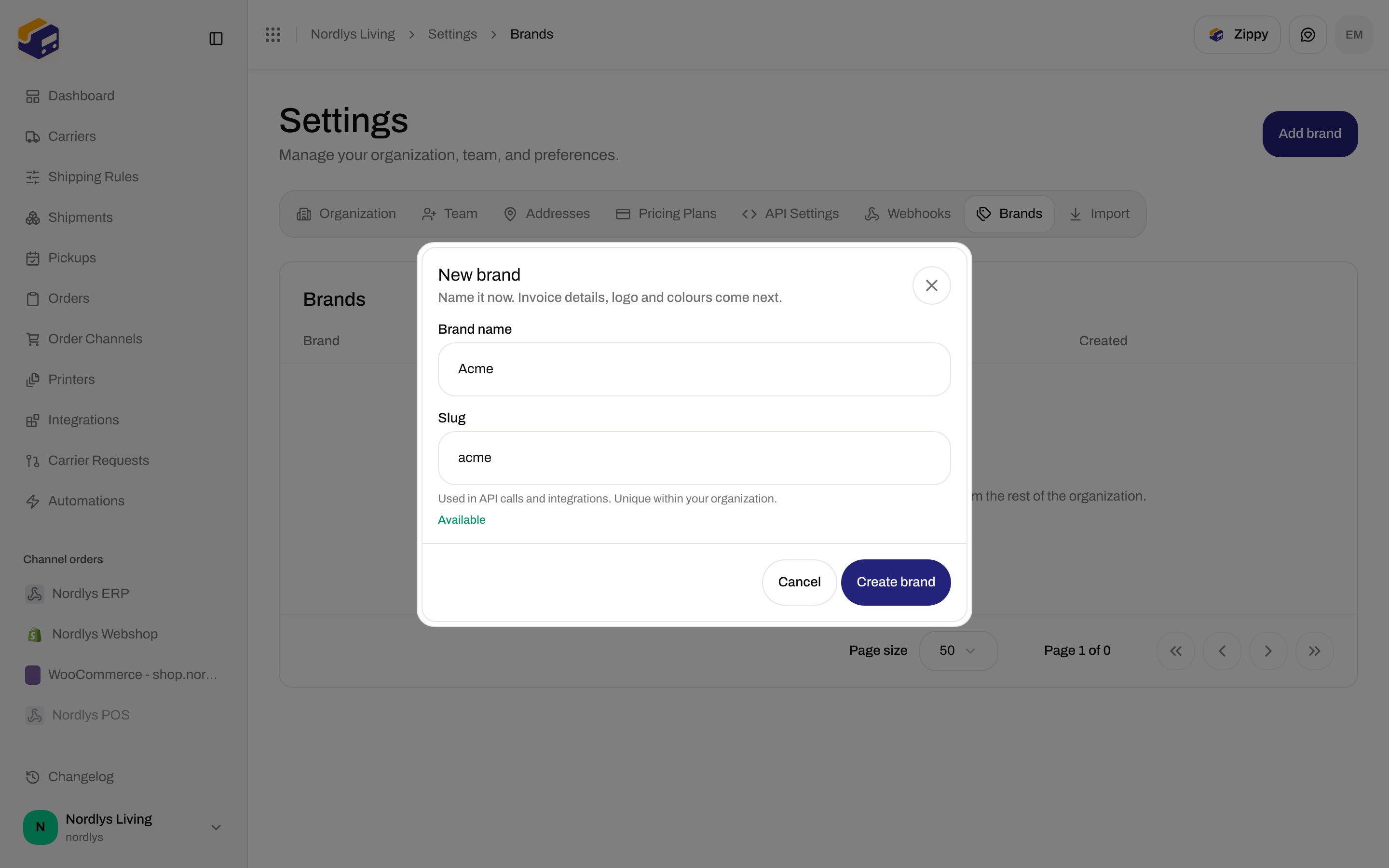
 These are the only create fields:
| Field | Required | What it is |
| -------------- | -------- | --------------------------------------------------------------------------------------------------------------------------------------------------------------------------------------------------------------------------------------------------------------------------------------------------------------------------------------------------------------------------------------------------------------- |
| **Brand name** | Yes | 1–120 characters after trim. Placeholder **Acme**. As you type, **Slug** fills in automatically (Nordic letters are transliterated). |
| **Slug** | Yes | 2–60 characters. Pattern: lowercase letters, numbers, and single hyphens between groups — no leading or trailing hyphen (`^[a-z0-9]+(?:-[a-z0-9]+)*$`). Placeholder **acme**. Help text: **Used in API calls and integrations. Unique within your organization.** After a pause, the field shows **Available** or **Already used by another brand**. Editing the slug by hand stops it from following the name. |
Buttons: **Cancel**, **Create brand**. **Create brand** stays disabled while the form is invalid or the slug is taken.
Click **Create your first brand**, or **Add brand** if you already have brands.
Enter **Brand name**. Check **Slug** (edit it if you need a stable API name).
Click **Create brand**. Zippendo opens the new brand’s page so you can fill invoice details, address, customs identifiers, and document branding.
Toasts: **Brand created** / **Brand could not be created**. Duplicate slug: **A brand with this slug already exists in this organization.** (`BRAND_SLUG_EXISTS`).
The create dialog does not collect invoice details, VAT, address, customs IDs, logo, or colours. Those are on the brand detail page after create. Logo and colours: [Organization branding](/docs/how-to/branding). Customs identifiers also live on [Organization settings](/docs/how-to/organization-settings) for the house-wide defaults.
## After you have brands
When brands exist, the list columns are **Brand**, **Slug**, **VAT number** (— if inherited), **Status** (**Active** / **Archived**), and **Created**.
Row actions:
| Action | What it does |
| -------------- | ------------------------------------------------------------------------------------------------------------------------------------------------------------------------------------------------------------------------------------------------------------------------------------------------------------------------------------------------------------------ |
| **Edit brand** | Opens the brand detail page. |
| **Archive** | Toast **Brand archived** / **Brand could not be archived**. |
| **Restore** | Toast **Brand restored** / **Brand could not be restored**. |
| **Delete** | Dialog **Delete brand**: **This permanently deletes \{name}. Only possible while nothing is attached to it.** If records exist, copy **This brand still has data attached. Archive it instead to keep its records.** and/or toast **This brand still has records attached. Archive it instead of deleting it.** (`BRAND_HAS_RECORDS`). Success: **Brand deleted**. |
`BRAND_ACCESS_DENIED`: **You do not have access to this brand.**
Load errors on the list: **Brands could not be loaded** / **The brand list could not be fetched. Check your connection and try again.** with **Try again**. Missing brand: **Brand not found** / **This brand no longer exists, or it belongs to another organization.**
The organization switcher adds a **Brands** section only after at least one brand exists (or if your account is brand-locked). That menu — **All brands**, **Search brands…**, **Manage brands**, **Switching brand…** — is documented on [Switch organization and brand](/docs/how-to/switch-organization-and-brand). Do not create a brand in the docs org just to capture that menu; the empty **Brands** tab is the intended Nordlys shot.
## Related
* [Switch organization and brand](/docs/how-to/switch-organization-and-brand) — pick **All brands** or one brand.
* [Organization branding](/docs/how-to/branding) — logo and colours on org and brand detail.
* [Organization settings](/docs/how-to/organization-settings) — house-wide customs IDs brands can inherit.
* [Invite team members](/docs/how-to/invite-team-members) — **Restrict the invitee to a brand**.
* [Billing and usage](/docs/how-to/billing-and-usage) — Pro / Enterprise entitlement.
* [Brands](/docs/settings/brands) — documentation for this tab.
These are the only create fields:
| Field | Required | What it is |
| -------------- | -------- | --------------------------------------------------------------------------------------------------------------------------------------------------------------------------------------------------------------------------------------------------------------------------------------------------------------------------------------------------------------------------------------------------------------- |
| **Brand name** | Yes | 1–120 characters after trim. Placeholder **Acme**. As you type, **Slug** fills in automatically (Nordic letters are transliterated). |
| **Slug** | Yes | 2–60 characters. Pattern: lowercase letters, numbers, and single hyphens between groups — no leading or trailing hyphen (`^[a-z0-9]+(?:-[a-z0-9]+)*$`). Placeholder **acme**. Help text: **Used in API calls and integrations. Unique within your organization.** After a pause, the field shows **Available** or **Already used by another brand**. Editing the slug by hand stops it from following the name. |
Buttons: **Cancel**, **Create brand**. **Create brand** stays disabled while the form is invalid or the slug is taken.
Click **Create your first brand**, or **Add brand** if you already have brands.
Enter **Brand name**. Check **Slug** (edit it if you need a stable API name).
Click **Create brand**. Zippendo opens the new brand’s page so you can fill invoice details, address, customs identifiers, and document branding.
Toasts: **Brand created** / **Brand could not be created**. Duplicate slug: **A brand with this slug already exists in this organization.** (`BRAND_SLUG_EXISTS`).
The create dialog does not collect invoice details, VAT, address, customs IDs, logo, or colours. Those are on the brand detail page after create. Logo and colours: [Organization branding](/docs/how-to/branding). Customs identifiers also live on [Organization settings](/docs/how-to/organization-settings) for the house-wide defaults.
## After you have brands
When brands exist, the list columns are **Brand**, **Slug**, **VAT number** (— if inherited), **Status** (**Active** / **Archived**), and **Created**.
Row actions:
| Action | What it does |
| -------------- | ------------------------------------------------------------------------------------------------------------------------------------------------------------------------------------------------------------------------------------------------------------------------------------------------------------------------------------------------------------------ |
| **Edit brand** | Opens the brand detail page. |
| **Archive** | Toast **Brand archived** / **Brand could not be archived**. |
| **Restore** | Toast **Brand restored** / **Brand could not be restored**. |
| **Delete** | Dialog **Delete brand**: **This permanently deletes \{name}. Only possible while nothing is attached to it.** If records exist, copy **This brand still has data attached. Archive it instead to keep its records.** and/or toast **This brand still has records attached. Archive it instead of deleting it.** (`BRAND_HAS_RECORDS`). Success: **Brand deleted**. |
`BRAND_ACCESS_DENIED`: **You do not have access to this brand.**
Load errors on the list: **Brands could not be loaded** / **The brand list could not be fetched. Check your connection and try again.** with **Try again**. Missing brand: **Brand not found** / **This brand no longer exists, or it belongs to another organization.**
The organization switcher adds a **Brands** section only after at least one brand exists (or if your account is brand-locked). That menu — **All brands**, **Search brands…**, **Manage brands**, **Switching brand…** — is documented on [Switch organization and brand](/docs/how-to/switch-organization-and-brand). Do not create a brand in the docs org just to capture that menu; the empty **Brands** tab is the intended Nordlys shot.
## Related
* [Switch organization and brand](/docs/how-to/switch-organization-and-brand) — pick **All brands** or one brand.
* [Organization branding](/docs/how-to/branding) — logo and colours on org and brand detail.
* [Organization settings](/docs/how-to/organization-settings) — house-wide customs IDs brands can inherit.
* [Invite team members](/docs/how-to/invite-team-members) — **Restrict the invitee to a brand**.
* [Billing and usage](/docs/how-to/billing-and-usage) — Pro / Enterprise entitlement.
* [Brands](/docs/settings/brands) — documentation for this tab.